
Implementing Force Update in React Native/SwiftUI for your apps
Either you shipped a broken update and need users off it immediately, or you're proactively realizing you have no way to control which versions of your app are in the wild. Here's how to fix that.

Force updates
Over your app's lifetime you start to have a long tail of old app versions. Many people don't have automatic updates turned on, let alone manually update their apps. This can become quite a liability when you have an old version you really don't want users to use - for example one with a broken paywall.
Unlike the web where you deploy and everyone gets the new version instantly, mobile apps live on users' devices. Once someone downloads your app, they're on that version until they decide to update. There's no native "force update" mechanism in React Native, iOS, or Android. But there are ways to build this yourself, either as dismissable nudges or a wall that prevents users from moving forward until they update.
How to do it
1. Build your own version check API
The most common approach is to spin up a server endpoint that returns the minimum supported version. Your app calls it on launch and shows an update prompt if the user is below minimum. This works fine but now you need to build, host, and maintain a server just for version checking. If that server goes down, your app is stuck, not to mention having to deal with all sorts of edge cases with offline users.
2. CodePush / OTA updates
CodePush lets you push JS bundle updates without going through App Store review but it was moved to App Center which itself was sunset by Microsoft in March 2025.
3. Google Play In-App Updates API
Android only. Doesn't exist for iOS.
4. Firebase Remote Config
Store a minimum version in Remote Config and check on launch. This works but you're adding Firebase as a dependency just for version checking.
5. SideKit
This is one of the things built-into sidekit. It works out of the box when you integrate the SideKit SDK which should be < 3 lines of code.
SideKit
SideKit is a lightweight SDK for mobile apps which gives you all the tooling you need for your app in one package. I built it because I was tired of stitching together a bunch of different services just to run a simple app in production. Version management is one of the things that comes out of the box.
How it works
If you integrate the SDK, the version management stuff should just work out of the box! Everything else is controlled from the dashboard. No code changes needed to block a version or force an update, you just toggle it from the web.
The versions table
This is the main interface for managing your app versions:
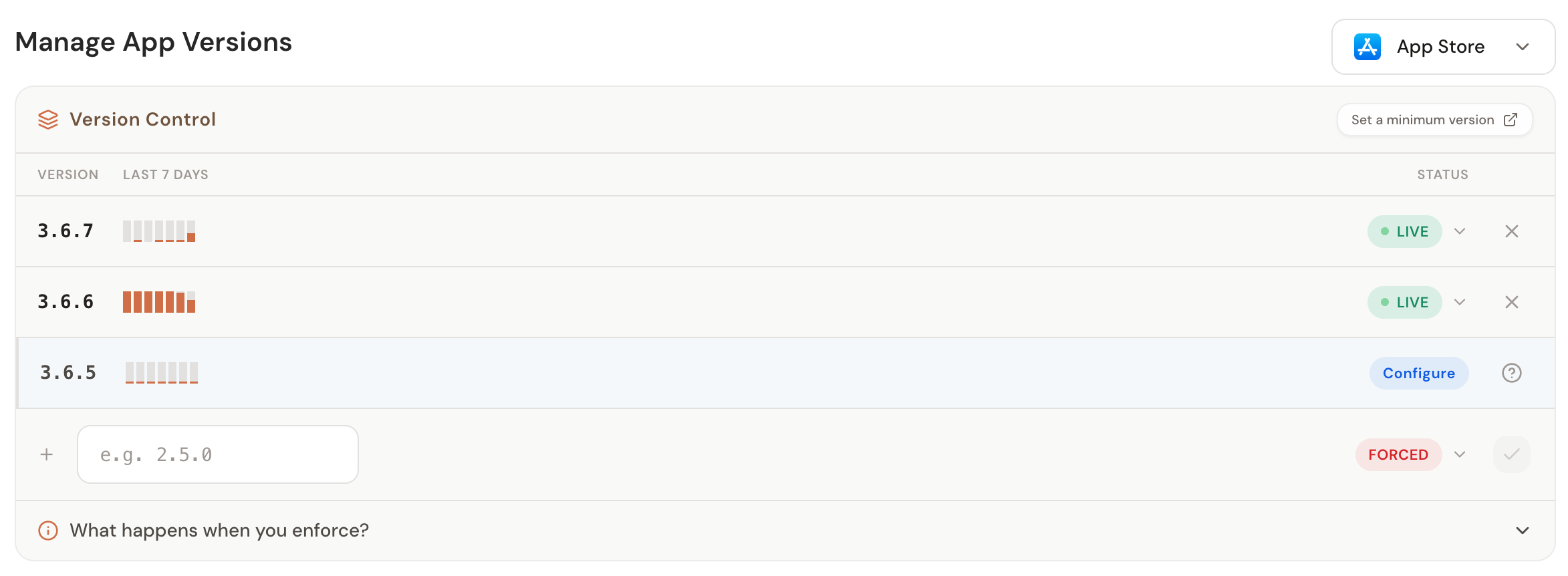
The table automatically picks up versions from your analytics data. As users on different app versions send signals, those versions show up here without you having to manually add them. Each version shows a sparkline of its usage over the last 7 days so you can see at a glance how many people are actually on that version before you decide to do anything about it.
From here you can set the status on any version. There are a few options:
- Live — no restrictions, users can continue using the app normally. This is the default.
- Blocked (Forced) — users on this version must update to continue. They cannot dismiss the prompt. Use this for broken builds, security issues, anything that can't stay in the wild.
- Blocked (Dismissible) — users see an update prompt but can skip it and keep using the app. Good for when you want to nudge people to a newer version without locking them out.
You can also set a minimum version which acts as a floor — anyone below that version gets a forced update gate.
The Update Preview
The update preview shows you exactly what your users will see when they hit a version gate:
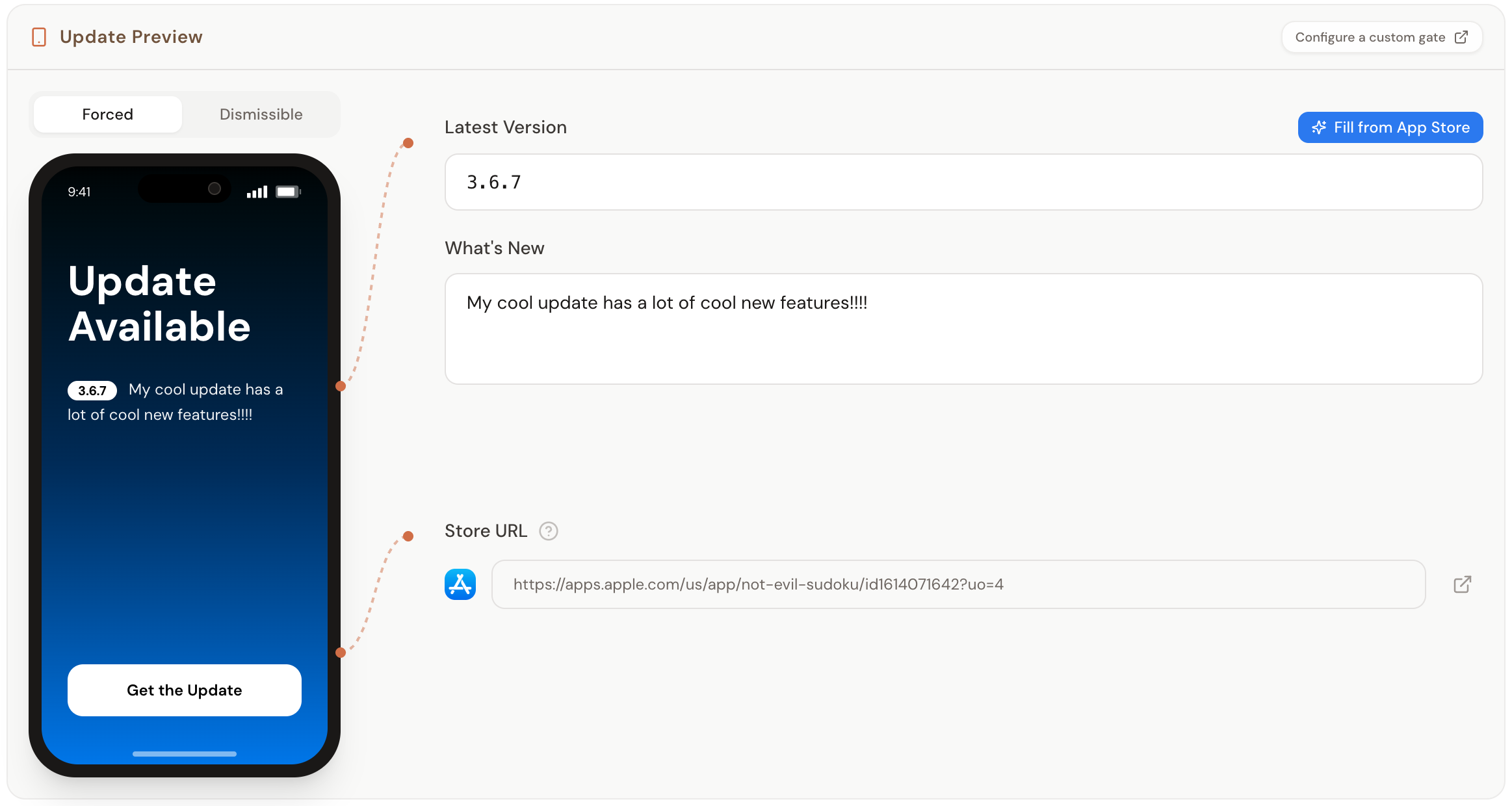
You can toggle between the forced and dismissible views to see how each one looks. We also support filling in the what's new and version field from the App Store so you don't even need to write them yourself.
If the default gate UI doesn't work for you, SideKit also lets you build a fully custom version gate in your app's style. The SDK gives you the gate information (what type of gate it is, the latest version, the "What's New" text, the store URL) and you can render whatever UI you want with it.
Set it up before you need it
It's not possible to retroactively add version gating so it's something you should bake into your app as soon as you can. If v2.3.0 has a critical bug and you haven't integrated any version management, you're just stuck waiting for users to organically update while your reviews tank.
Get started with SideKit here.